The CRM built for interior designers
Stop losing leads in WhatsApp inboxes. A 7-stage pipeline matched to how interior design sales actually work — with priority pills, source tracking, follow-up alerts, appointments and one-tap WhatsApp on every lead.
Track every interior design lead in 7 stages: New → Contacted → Site Visit → Proposal → Negotiation → Won / Lost. One-tap WhatsApp on every card, follow-up alerts when you go quiet, and live KPIs for pipeline value, hot leads and conversion %.
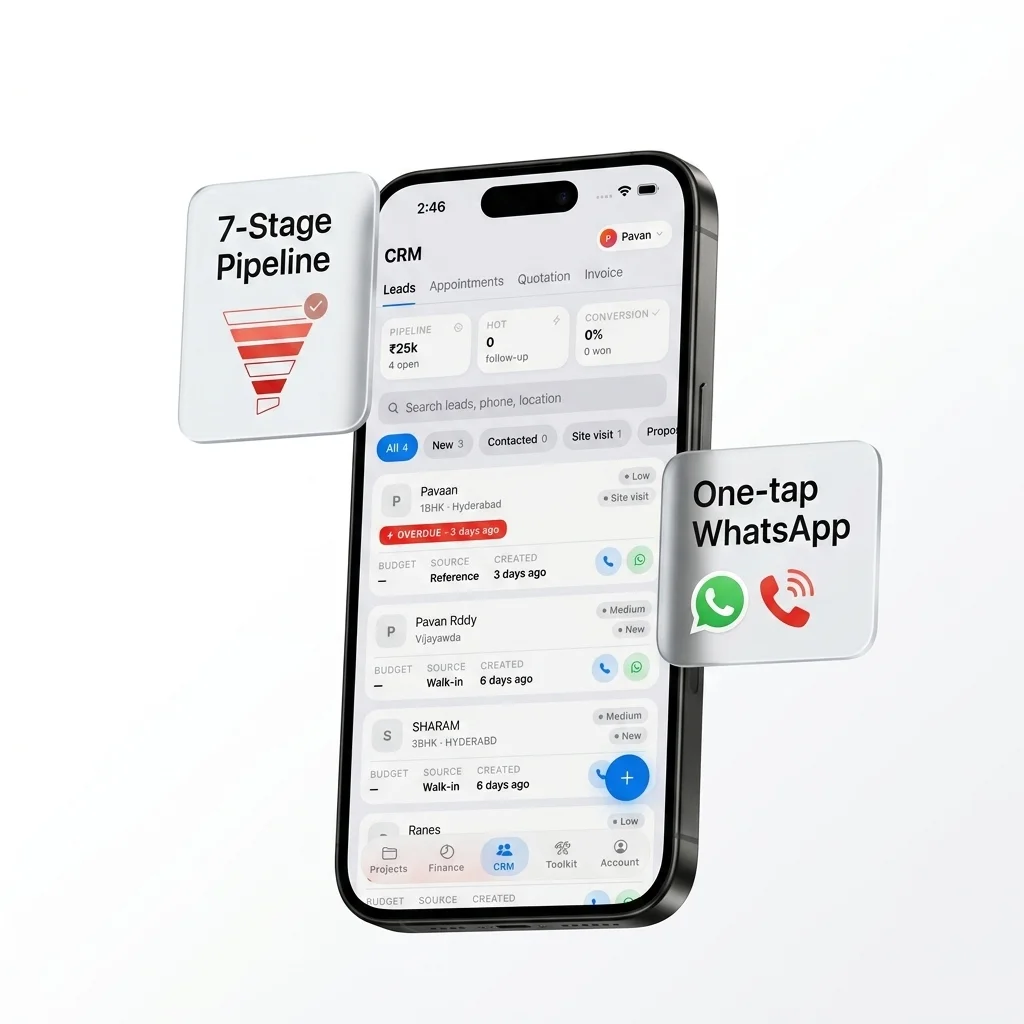
Every lead, every meeting, in one place
Stop juggling WhatsApp chats, paper notebooks and Excel pipelines. Interior IO CRM is keyed to the way interior design studios actually win clients.
7-stage pipeline
New → Contacted → Site Visit → Proposal → Negotiation → Won / Lost. Built for design sales.
Hot / Medium / Low
Priority pills make hot leads visually unmissable on the list. Sort and filter by priority.
One-tap WhatsApp
Green WhatsApp button on every lead card. No copy-pasting numbers, no fumbling.
Appointments
Site visits, client meetings, design reviews — all in one calendar with overdue alerts.
Seven stages, one flow
Every interior design lead moves through the same seven stages. Update the stage, and the lead automatically reorders on the list.
Everything you need on one card
Each lead card shows priority (Hot reads red for instant attention), source, budget, current stage, last contact and the next follow-up date. Tap-to-call and one-tap WhatsApp icons are right there — no copy-pasting numbers, no opening another app.
- Priority pills — Hot (red), Medium (orange), Low (grey)
- Source tags — Instagram, Referral, Website, Walk-in, Other
- Budget capture for pipeline value calculation
- Tap-to-call opens dialer with lead's number
- Tap-to-WhatsApp opens chat ready to message
- Overdue follow-up shows red OVERDUE ribbon
assets/feature-crm-leads.pngSite visits and client meetings, never missed
Schedule site visits, client meetings or design reviews from a lead or directly in the Appointments tab. Today's appointments float to the top, overdue ones get an alert. Link any appointment to a lead so context is one tap away.
- Title, date & time, location, notes per appointment
- Optional link to a lead — context follows you
- Today's count visible in the KPI strip
- Overdue badge on missed appointments
- Calendar view with month / week / day filters
assets/feature-crm-appointments.pngKnow your pipeline value, instantly
The KPI strip at the top of the Leads tab shows your live pipeline value (₹), hot lead count and conversion %. Spot dry weeks before they hurt cash flow. Track which sources (Instagram vs Referrals) actually convert.
- Pipeline value — sum of budget across open leads
- Hot lead count — leads tagged for immediate action
- Conversion % — won / total closed
- Source-level conversion to identify best channels
- Won lead → project conversion in one tap
assets/feature-crm-kpis.pngFrom WhatsApp inbox to a real pipeline
Most studios lose 30% of leads to slow follow-up. Interior IO makes follow-up structural, not optional.
Without Interior IO
- Leads buried in WhatsApp threads, easy to forget
- Excel pipeline only updated weekly (or never)
- No reminder for follow-ups — leads go cold
- No visibility into which sources actually convert
- Hot leads treated the same as cold ones
- Calling means copy-pasting numbers from notes
With Interior IO
- Every lead in one searchable, sortable list
- Stage updates the moment they happen
- Overdue follow-ups flagged in red on the list
- KPI strip shows source conversion %
- Hot pill (red) makes priority impossible to miss
- One-tap call and WhatsApp on every card
Common questions
What is the best CRM for interior designers in India?
Can I track where my leads come from?
Does it have WhatsApp integration?
What happens to a lead when I win it?
How do follow-up reminders work?
Can my whole team see leads?
Stop losing leads in WhatsApp
Free forever for 1 project, plus full CRM access. Set up your pipeline in 5 minutes.